

Google Messages Gets a Fun New Twist with Chat Themes, But
Google Messages Gets a Fun New Twist with Chat Themes, But
Key Highlights
- Google introduces new chat themes to its Messages app
- Customizable backgrounds and bubble colors add a personal touch
- The feature is available for Android users
- A bug has been reported that freezes the app when switching between themes
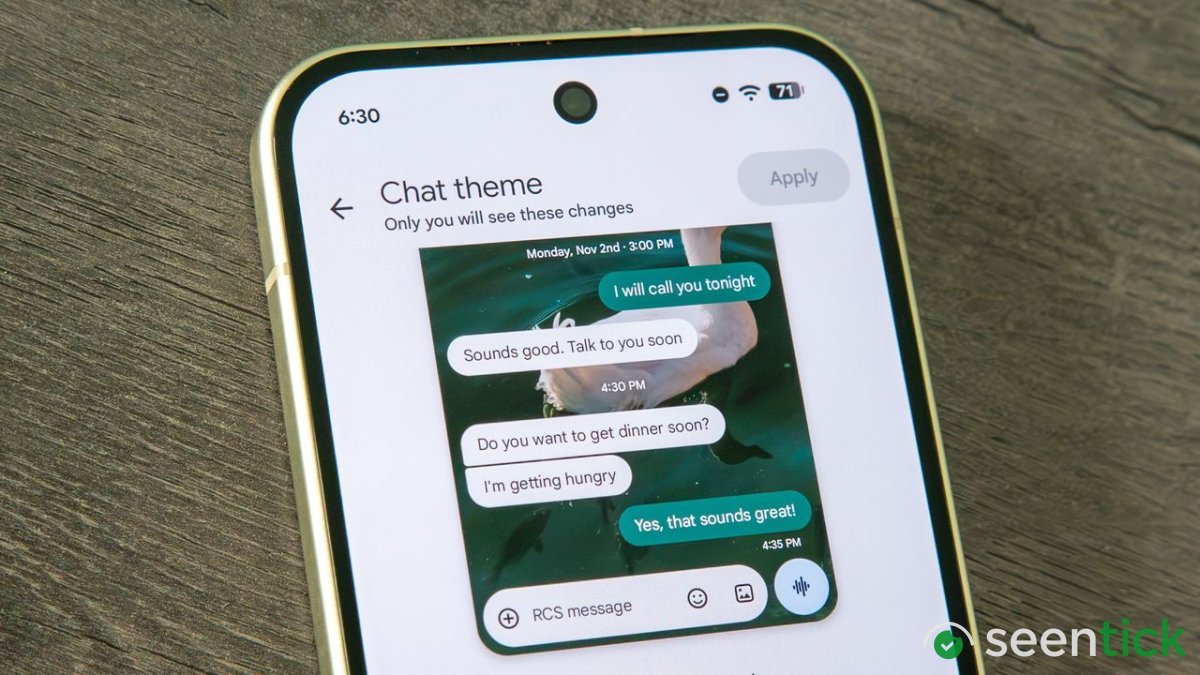
Google has taken a significant step forward in enhancing the functionality of its Messages app, introducing new chat themes that allow users to personalize their conversations with unprecedented freedom. This latest update builds upon the RCS feature set, which has been steadily improving the app's features over the years.
One of the most exciting aspects of this new feature is the ability to choose from a selection of photos or upload your own as a background for your chat. Not only does this add a touch of personality to your conversations, but it also allows you to change the color of chat bubbles to match your theme, creating a cohesive and visually appealing experience.
Read More: I Tested the Poco F9 Ultra, and It Is the Undisputed Value Flagship Smartphone of the Year
Changing your chat theme google
Changing your chat theme in Google Messages is a straightforward process. To get started, simply open a message, tap the three dots in the top right corner of your chat, and then select "Chat theme" from the overflow menu. From there, you can browse through the provided themes or upload an image from your gallery to create a unique look.
While chat themes are undoubtedly a fantastic upgrade to the Google Messages experience, some users may find that they wish for more customization options. For instance, it would be great if users could generate their own background images on-device using Nano, similar to how iPhones allow users to describe or edit preloaded backgrounds with Apple Intelligence.
Also Read: Bhumi Pednekar Reacts to 16-Year-Old's Assault in Delhi: Demands Strictest Punishment
Another feature that could take chat themes to the next level is the ability to sync background choices across devices. Currently, when you apply a theme, it only shows up for you but not for the recipient. However, some apps like Instagram and Facebook Messenger already offer this functionality, leading to fun surprises and "fights" over which one to keep.
Lastly, there is a small bug that has been This can be fixed
Frequently Asked Questions
What's Your Reaction?
 Like
1
Like
1
 Dislike
 Love
Love
 Funny
Funny
 Wow
1
Wow
1
 Sad
Sad
 Angry
Angry

Tech journalist and AI enthusiast who enjoys keeping up with the latest in hardware, processors, emerging AI tools, and software. I like digging into new technology, understanding how things actually work, and following the developments that could shape the way we use technology in the future.






Comments (0)